API How to get started
How to Get Startetd
Registration
- Go to the Dashboard Register Page
- Fill out the registration form and click Create Account.
-
Check your email inbox for a verification email from http://Eventstation.ai .
-
Note: Some email providers may filter it as spam. Be sure to check your spam or junk folder.
- Return to the Dashboard Login Page and Log In.
- You're now logged into the Dashboard where you can administrate your API Account!
Log In To Interactive API UI
- Go to the Technical Documentation
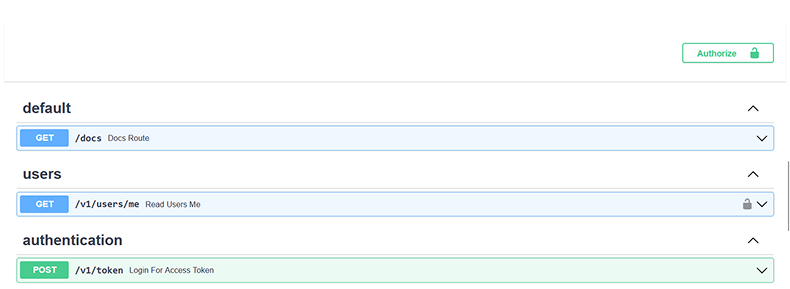
- Locate the Authorize button at the top-right corner above the first endpoint documentation, below the Tutorials.
- Click on it and enter the username and password provided to you.
Obtain a Bearer Token
You need a Bearer token to authenticate API requests. There are two ways to get one:
Option A — Via the API
Use the POST /v1/token endpoint in the Swagger UI. Provide your username and password. The response contains an access_token — this is your Bearer token.
Option B — Via the Dashboard
Log in to dashboard.eventstation.ai and click the "Get Bearer Token" button.
Include the token in the Authorization header of all subsequent requests:
Authorization: Bearer <your_access_token>
Buy Subscription
- Login to your account.
- After you logged in view the Subscription Plans
- Choose a Tier which suits your needs and click on Subscribe now and follow the Payment Process.
- After your Payment is Processed succesfully, you get the Subscription Credits added to your account.
Cancel Subscription
- Login to your account.
- continue here steps to cancel sub