API > Core Products API > Sketch
Sketch Best practices
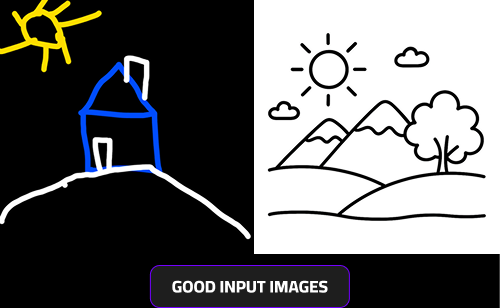
What Is a Good Input Image
For the best possible results, use high-contrast sketches, ideally in black and white. Colored drawings can also work well as long as they maintain a strong contrast between lines and background.
Low-contrast or very light colors may cause the AI to misinterpret parts of the drawing or fail to recognize certain elements accurately.
Avoid adding very small or overly detailed elements, as these may not be detected or transformed correctly by the AI. Clear, bold lines with visible shapes produce the most reliable and artistic outcomes.
How Can I Create a Good User Journey
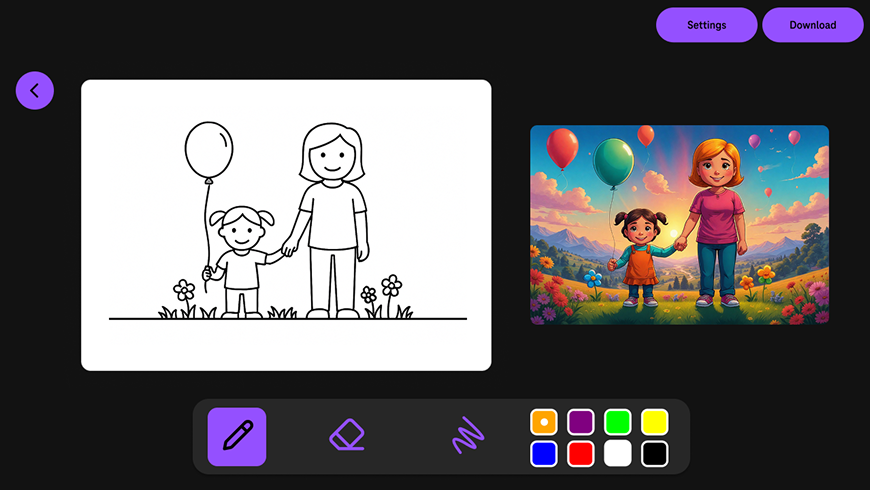
Based on our experience, the most effective way to implement Sketch is by creating an interactive split-screen layout:
- On the left side, provide an active drawing area where users can freely draw using brushes, erasers, and color selection tools.
- On the right side, display a result screen that showcases the AI-generated artwork.
To create a dynamic and engaging experience:
- Make a new API call every 10–15 seconds to generate an updated version of the artwork based on the user’s latest sketch.
- This allows participants to see their drawings gradually transform into complete works of art in near real time.
This setup promotes creativity and interactivity, making it ideal for events, workshops, exhibitions, or similar activations.