API > Core Products API > Video
How does Video work?
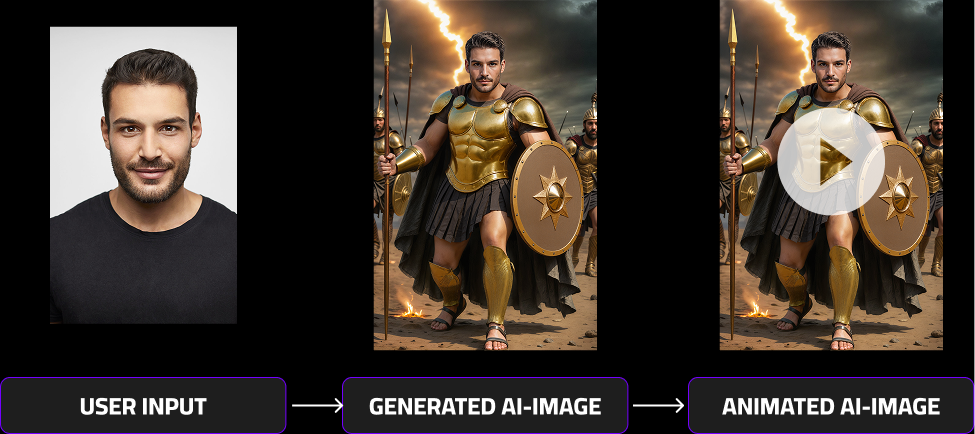
The Video feature is designed to animate personalized AI-generated images, turning them into short, dynamic video clips.
To use it effectively, follow the process below:
- Generate an AI Image
Start by creating an image using your preferred AI model, such as MultiSwap or FaceSwap, through the respective image generation API endpoint. - Add a Prompt and Send to the Video Endpoint
Once you receive your generated image, use it together with a custom prompt describing the desired motion or animation.
(For guidance on crafting effective prompts, see the Self-Prompting section.) - Receive the Animated Result
After approximately 2–3 minutes, the system will return your animated AI image — bringing your creation to life with smooth, AI-driven motion.
This workflow ensures you can easily transform any static image into an engaging and shareable video experience.
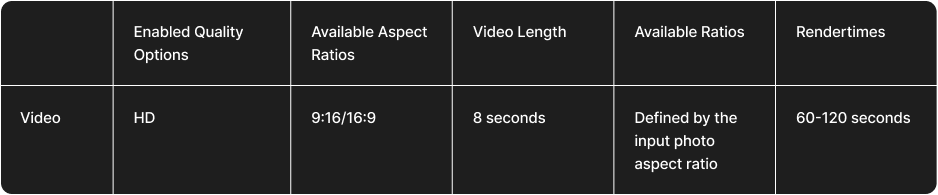
Video rendertimes comparison
Below, you’ll find detailed information about Video generation times. Keep in mind that the total render time depends on two factors:
- The AI model used to generate the input image (e.g., FaceSwap v4 or v5).
- The video generation process, which adds motion and animation to the image.
To calculate the total render time, simply combine both values. For example:
- FaceSwap v5 model render time: approximately 20–30 seconds
- Video generation time: approximately 120 seconds (2 minutes)
Total average render time:
➡️ 140–150 seconds (≈2–2.5 minutes)
Actual render times may vary slightly depending on server load, complexity of the animation, and the selected output quality.
For a visual comparison of results in both Realistic and Stylized modes, please refer to the section above.