API > Core Products API > Video
Video best practices
What are good input images?
The quality and composition of your input image have a major impact on the final video result. To achieve the best possible outcome, make sure your images follow the recommendations below.
✅ DO
- Use clean, high-resolution images with clear details.
- Ensure the subject is well separated from the background — strong depth and contrast help the AI interpret movement correctly.
- Keep neutral, relaxed poses — avoid extreme angles or overlapping limbs.
- Use natural, even lighting with soft shadows.
- Center the subject and avoid cropping key features such as the head, arms, or hands.

❌ DON’T
- Don’t use images with AI artifacts (extra fingers, distorted faces, or blurred textures).
- Avoid flat or overly busy backgrounds, as they confuse depth perception.
- Don’t use photos where the face or body is partially covered by hair, hands, or props.
- Avoid complex or extreme poses such as jumping, twisting, or strong perspective distortion.

How should i create a good user journey
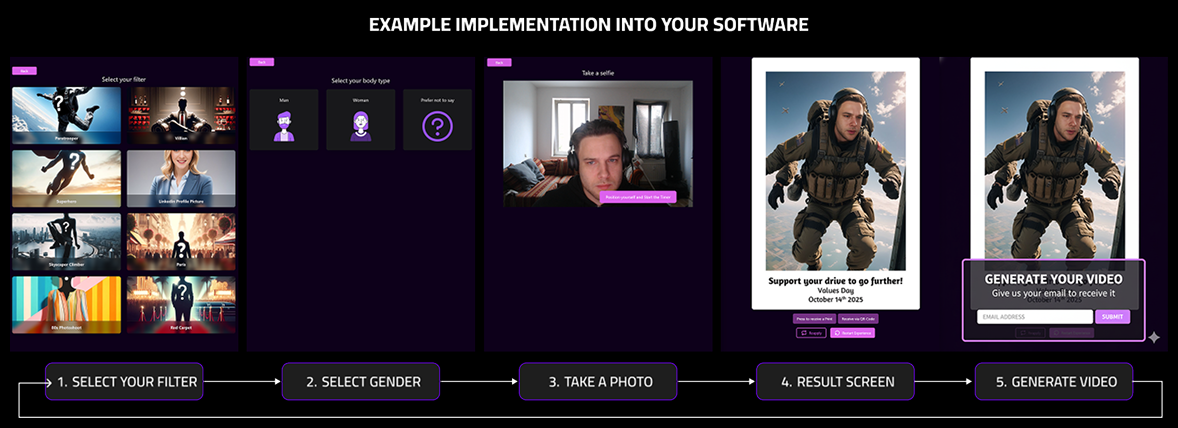
To integrate the Video experience seamlessly into your web app or photo booth setup, follow the recommended flow below:
- Filter or Style Selection – Let users choose their preferred filter, scene, or effect for the AI image.
- Photo Capture – Start a short countdown before taking the photo, giving users time to pose.
- Image Processing & Results – While the AI image is generated, display a loading screen. Once ready, show the result on the Result Screen.
- Generate Video Option – On the result screen, include a clear “Generate Video” button. When users select it, prompt them to enter their email address (or phone number).
- Email Notification – After the video is generated (typically within 2–3 minutes), the user receives a notification with a link to view or download their personalized AI video.
This approach allows participants to continue enjoying the event without waiting in front of the screen, while still receiving their finished video directly on their device — ensuring a smooth, engaging, and practical user experience.