How to create a good QA Dataset?
A QA (Quality Assurance) dataset is essential for testing how well your self-created filters perform in real-world conditions. By using diverse test images, you can evaluate if your filter generates consistent, high-quality results across different people, lighting, and scenarios. This ensures your filters are production-ready before being used at live events.
Why a QA Dataset Matters
When you create a filter in the Filter Creator, it’s important to test it on a range of faces and conditions.
A good QA dataset helps you identify whether the filter performs reliably — whether for people with different skin tones, ages, or accessories (like glasses, hijabs, or bald heads).
How to Create a Good FaceSwap QA Dataset
To build a high-quality dataset for FaceSwap, make sure your test images reflect the type of setup used at your events. For example:
- Stationary photobooths → close-up shots
- Event photobooths → medium or upper-body portraits
We recommend testing each filter with 5–10 different images that resemble your typical event shots.
Diversity is key: include:
- Different age groups
- Different skin colors
- Accessories (glasses, hijabs, bald heads, etc.)
💡 Pro Tip:
If a filter fails on more than 2 out of 10 images and displays any kind of unwanted artifacts, it’s not ready for production.
Review your prompt, check for masking issues, or adjust settings such as denoise and depth for image2filter, then test again.
How to Create a Good MultiSwap QA Dataset
Creating a strong QA dataset for MultiSwap is crucial, as this product handles 1–5 people at once — each with their own pose, expression, skin tone, and accessories. A good dataset ensures your filter performs reliably under real event conditions.
Match Your Event’s Photobooth Style
Always test with images that accurately reflect the type of photos your photobooth will capture. For example:
- Stationary booths → upper-body or medium shots
- DSLR setups → sharp, close-up portraits
- Event booths → real-world lighting and positioning
Testing with images that differ from your actual setup will not reflect real performance.
Include Pose Diversity
Since MultiSwap preserves group poses, your QA dataset should include:
- People standing close together
- Different natural body angles (slight turns, relaxed posture)
- Hands in frame vs. out of frame
- Interactions between people
This helps determine how stable your filter is across realistic group poses.
Use a Diverse Set of People
Your QA dataset should include:
- Different skin tones
- Different age groups (kids + adults)
- Accessories (glasses, hats, hijabs, jewelry, bald heads)
- Different lighting conditions
- Mixed group sizes (1–5 people)
The more varied your dataset, the more reliable your filter will be for all users.
Test for Stability
We recommend testing each MultiSwap filter on 10 images that reflect your real-world use case.
Rule of thumb:
If a filter fails on more than 2 out of 10 images, it’s not ready for production.
Review your:
- Prompt
- Descriptions of outfits/environment
- Scene complexity
Then refine and retest.
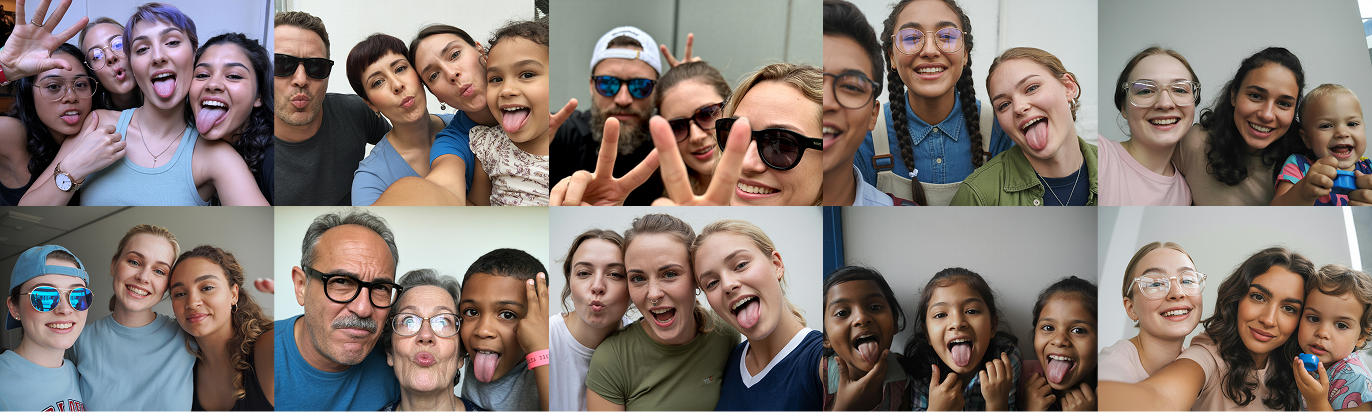
Example Dataset
Learn More
To fully understand how MultiSwap works — and how it differs from FaceSwap — visit our detailed guides: