Purchasable Image Filter Services
Custom AI Image Filters
Overview – Service Options & Pricing (For Subscribers Only)
Custom AI image filters are premium add-on services available exclusively to active Eventstation subscription holders.
All requests are submitted only via the Filter Creator inside your account. Custom AI filters are purchasable add-ons and not included in subscription pricing.
- Service Overview
- Deep Dive Service 1: Inpainting
- Deep Dive Service 2: Concept & Filter Creation
- Deep Dive Service 3: Generative Filter
- Process & Approval Flow
- Timeline
Service Options & Pricing
| Service Type | Price (excl. VAT) | Scope | Best For |
|---|---|---|---|
| Inpainting – Non Branded (Single Person) | 1,200 € | Existing image enabled as a Filter for Adults and kids | Stylized visuals without brand elements on the person/body (e.g. jerseys, logos or similar) |
| Inpainting – Branded (Single Person) | 1,600 € | Existing image incl. logo, text, clothing specifics | Commercial campaigns, brand-critical use cases with brand elements on the body (e.g. jerseys, logos or similar) |
| Concept & Filter Creation via Inpainting (Single Person) | Starting at 1,600€ | Advisory, creating concept and final filter | A-Z Service to turn your idea into ai-filters |
| Generative Filter (Single our Miltiple Person) (Coming Soon) | Upon Request | Full scene creation incl. external assets | Creative storytelling, flexible scenes, Group activations & multi-person experiences |
Service Overview - What’s Included (General Service & Deliverables)
These services are ideal for brands and event formats that require high-quality, repeatable, on-brand AI visuals—ready to deploy inside your Eventstation flow. Every custom AI image filter package is delivered and includes:
- Creative advisory + execution by eventstation artists tailored to your brief
- Output quality: Full HD or higher (commercial-ready)
- Approval outputs: 20 personalized test images generated using Eventstation’s standardized test dataset
- Timely Execution: Execution within 14 days; pending on the project scope.
Access
|
Revisions
|
Draft Policy
|
Deep Dive Service 1: Inpainting (Single Person)
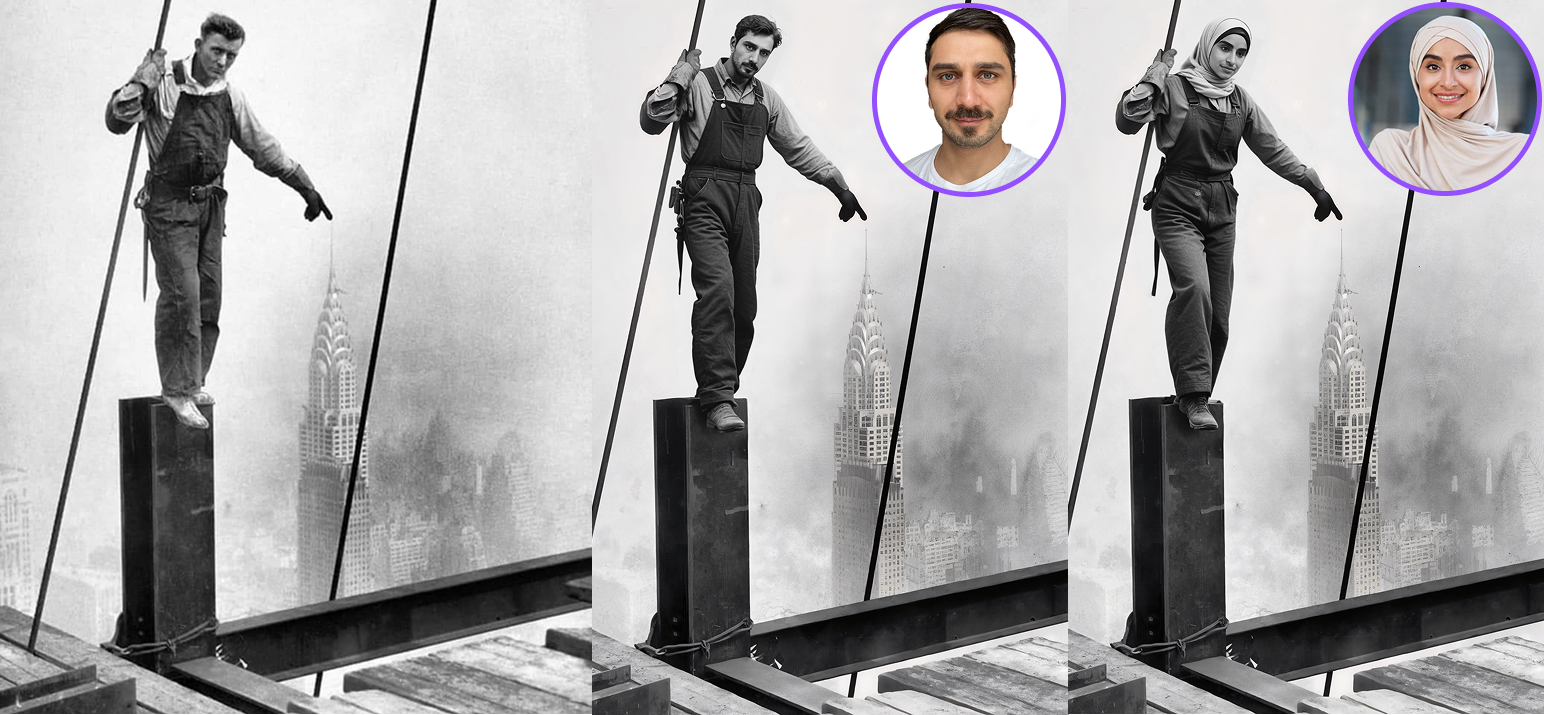
Inpainting enhances an existing photo instead of fully generating a new body.
Deep Dive Service 1.1: Non-Branded Inpainting – 1,200 €
Includes:
- Enhancement of any provided existing photo
- Artistic refinement & scene adjustments
- 2 revision rounds
Best for:
When you want to use any kind of existing material or photos. for Campaigns without strict logo or brand placement requirements on the person.
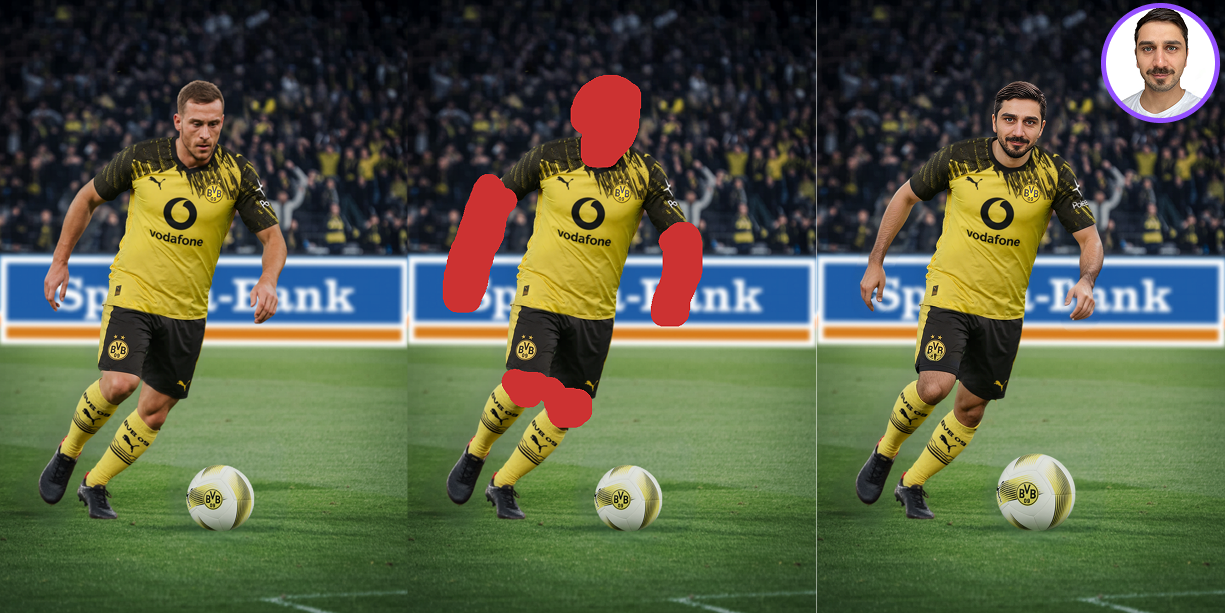
Deep Dive Service 1.2: Branded Inpainting – 1,600 €
Includes:
- Logo, text, specific clothing integration
- Gender & age specific filter versions
- Usage of 1 provided photo
- 2 revision rounds
- Eventstation uses the given photo “as is”
Best for:
Brand campaigns requiring exact typography, logos, or clothing preservation.
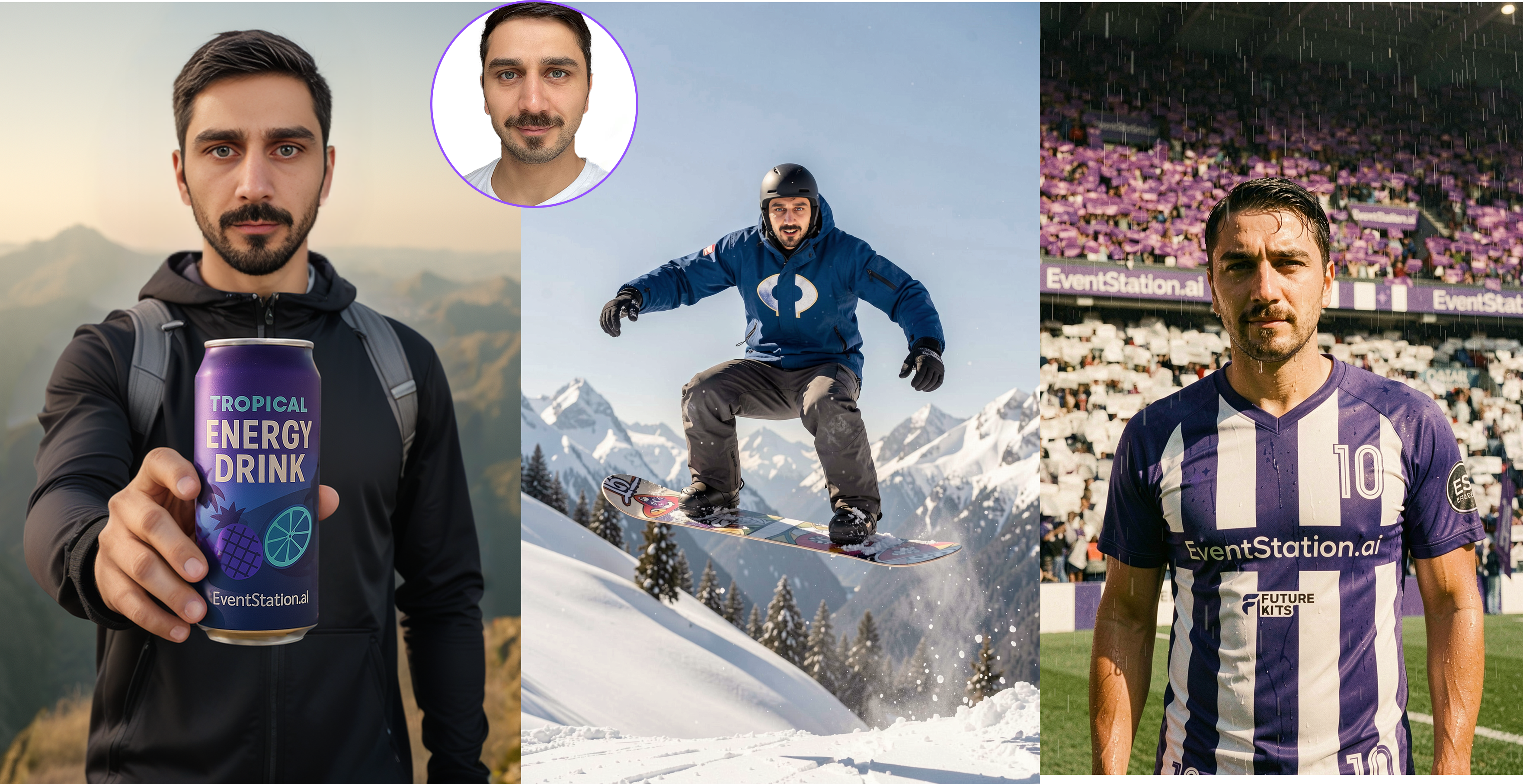
Deep Dive Service 2: Concept & Filter Creation via Inpainting (Single or Multiple Person) - Starting at 1600€
Depending on your creative direction we use:
- MultiSwap models
- FaceSwap models
Includes:
- Advisory to define the concept based on your needs
-
Eventstation creates a completely new scene based on your creative input.
-
2 Revisions included for concept & filter creation
Best for:
A-Z Advisory for any kind of activation
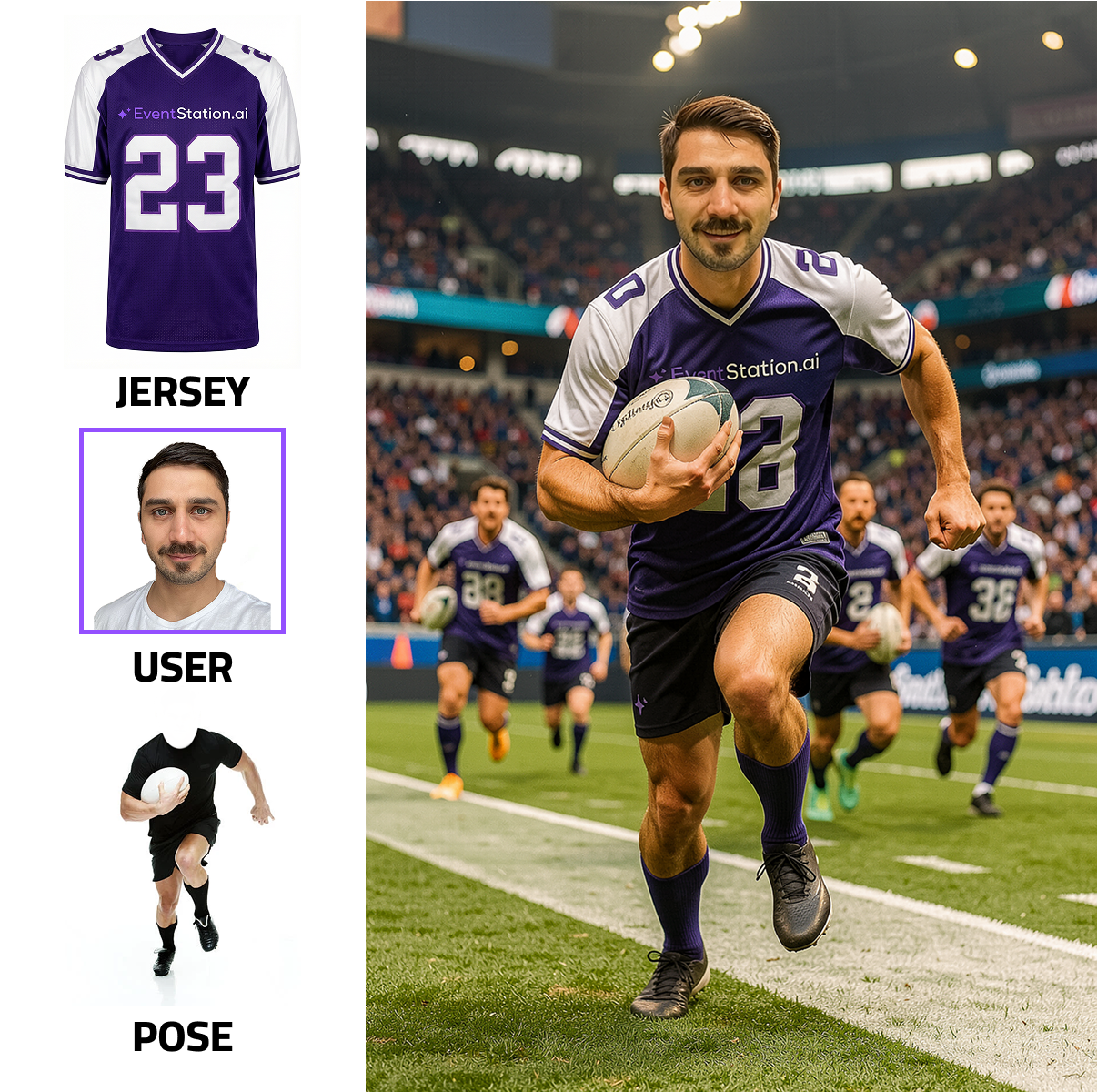
Deep Dive Service 3: Generative Filter (Single our Multiple Person) (Coming Soon)
Included:
- Full generative body & scene creation
- External photo assets can be integrated into the scene
- Any type of reference images allowed
Important limitations:
- Assets can be used inside the scene
- Assets can be placed on the body but it can have slight variations
- Bodies are always fully AI-generated
Best for:
Creative, flexible storytelling where exact product placement on clothing is not required.
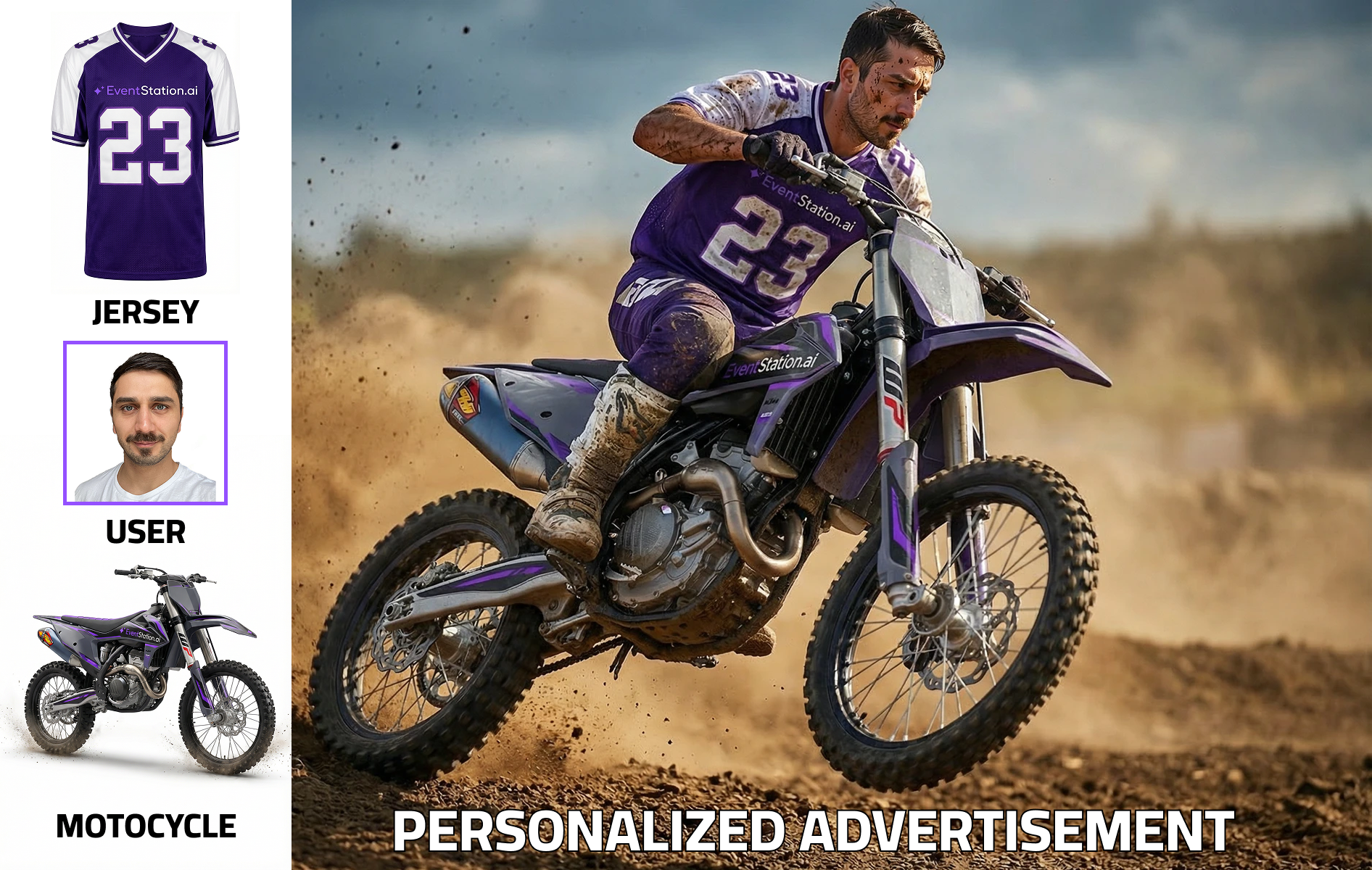
What can be included?
- Define Pose
- Define Background
- Define worn clothes
 |
 |
How We Choose the Model
The appropriate model is selected based on:
- Number of people
- Need for branded clothing or logos
- Importance of exact product placement
- Desired realism vs. artistic flexibility
If unsure, our team will guide you toward the best-performing solution for your activation.
Comparison Faceswap vs Multiswap Group Filter:
| Criteria | FaceSwap (Group Filter with Brand Precision) | MultiSwap (True Group Composition Model) |
|---|---|---|
| Best For | Commercial campaigns requiring product, logo, or outfit consistency | Natural group scenes and multi-person experiences |
| Core Optimization | Optimized for single-person facial accuracy, adaptable to structured group use cases | Specifically optimized for multi-person posing and correct body representation |
| People Supported | Primarily single-person logic, structured group use possible | Up to 5 people per image |
| Brand Integration | High consistency for logos, branded clothing, buildings, fixed brand elements | Direct integration of logos or specific branded items not possible |
| Facial Detail | Highest facial detail and integration quality | High realism with balanced group harmonization |
| Pose Handling | Defined poses with clearly rendered wearables | Transfers pose and composition from the input photo |
| Body Proportions | May occasionally show slight proportion inconsistencies | More realistic and proportionally correct body rendering in groups |
| Limitation | Minor inconsistencies in body size or posture possible | No reliable logo / specific outfit placement |
| Recommended When | Brand integrity and product visibility are more important than perfect group body realism | Natural group dynamics and realistic proportions are the priority over strict brand control |
Process & Approval Flow
1. Submit Request: All requests must be submitted via the Filter Creator inside your Eventstation account.
2. Eventstation Approval: Our team reviews technical and creative feasibility.
Approval can only be granted if:
- All required assets are provided
- Technical feasibility is confirmed
- No critical assets are missing
If assets are missing or adjustments are required, we will inform you before approval.
3. Cost Estimation: After submitting your request, you will receive a formal cost estimation based on scope and feasibility.
4. Client Confirmation & pot. Draft Creation
Before production begins:
- The client must formally confirm the cost estimation
- A 50% upfront payment is required to create drafts if the client requris furtehr materials to approve the egenral project scope.
5. Production & Delivery
Once confirmed and payment is received:
- Creative advisory + execution by the Eventstation Artist Team
- Creation of initial drafts
- Up to 2 revision rounds included
- Delivery of 20 personalized test images (standardized dataset)
- Output quality: Full HD or higher (commercial-ready)
- Final approved version deployed directly to your Eventstation account and product environment
Important Notes Draft Policy:
- Drafts are not created for free
- The 50% upfront payment enables the creation of initial drafts
- If the project proceeds, the 50% is fully credited toward the final invoice
- Example
If a project costs 1,200 €:
- You pay 600 € upfront to start draft production
- If the project is approved, you only pay the remaining 600 €
- Total paid = 1,200 €
If the project is not approved after draft delivery:
- The 600 € upfront payment remains non-refundable
- If the project is canceled after draft delivery, the upfront payment is non-refundable
Timeline
After approval of cost estimation:
- Fast track: approx. 10–14 days (with very fast feedback cycles)
- Recommended: 3–4 weeks for optimal results
Timeline depends on:
- Complexity
- Feedback speed
- Revision scope
For further questions regarding this service, please contact: felixb@eventstation.ai