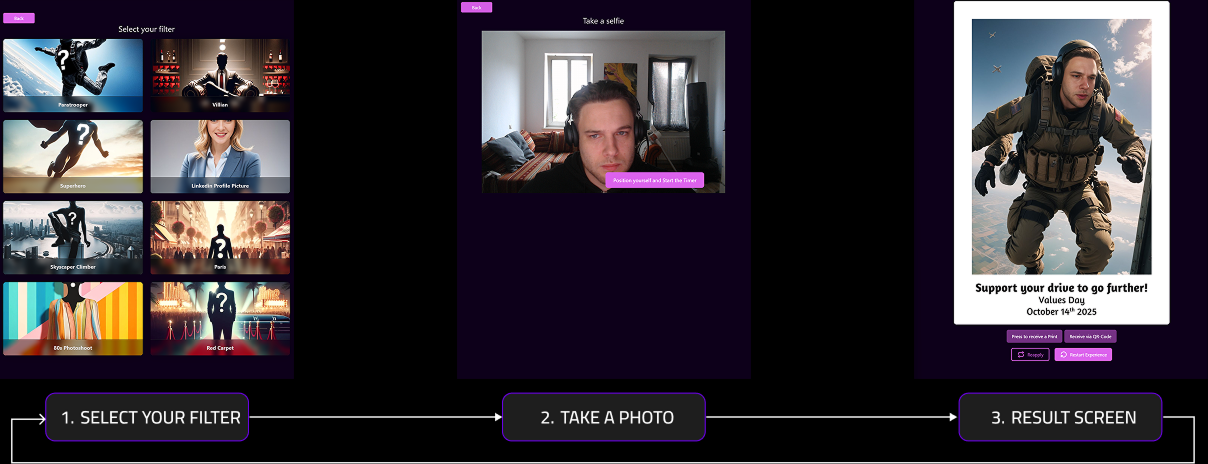
WebApp Help Center
What General benefetis do our webapp offer?
Our webbased Application allows you to offer personalized AI-Content to users of Photo activations. Integrate it into your booth and create new Revnue streams by offering new services. Our WebApp can be enabled on any kind of photobooth hardware with active WIFI-Connection.
- Event Creator: Enables you to manage and define options multiple events at the same time
- AI for Photobooths: Enables to offer persoanlized AI-Content for the end-user with predefined AI-Filters
- Diashow-Function: The created Assets can be showcased via External Screens
- Diverse AI-Services: Tools for Creators to enable you to create own AI-Disgns in diverse forms or use the 300+ template Designs available in diverse Styles and different topics
- Download-Center: Access & Share created Images after your event with guests directly.
What AI-Services do our webapp offer?
We offer plug & play GenAI Solutions tailored to the photo activation market and esp. the event sektor meeting high quality standards both for creating and sellings prints or for business clients and campaigns. Our solutions enable you to offer genai in an automated and no prompt way via your photbooth without any kind of hardware upgrade. For that we have to different inhouse models:
- Faceswap: For Single Person Shots
- Multiswap: For 1- up to 5 person)
We offer two different options to generate personalized images. You can use the models either via own created text prompts (self-prompting via the filter creator) or by using our predesigend Standardfilter by the Eventstation Team:
- Self-prompting: Access our Prompt Guides to get further insights how to create your own filter
- Filter Overview: Access all our available Designs in our Filter Overview (available as a download)!
What Means AI-Filter?
An AI filter at Eventstation.ai is a predefined effect to create image or videos (& via a predefined Model - e.g. multiswap or faceswap). It is created either by the Eventstation.ai team (standard or custom AI filter) or by you, the business customer (via our self-service). When people use the photo booth at an event, they can simply apply filters directly without having to enter anything.
Regardless of the ethnicity, gender, age or other characteristics of the users in front of the photo booth, the filter ensures the person(s) are displayed correctly and in accordance with the specified prompt.
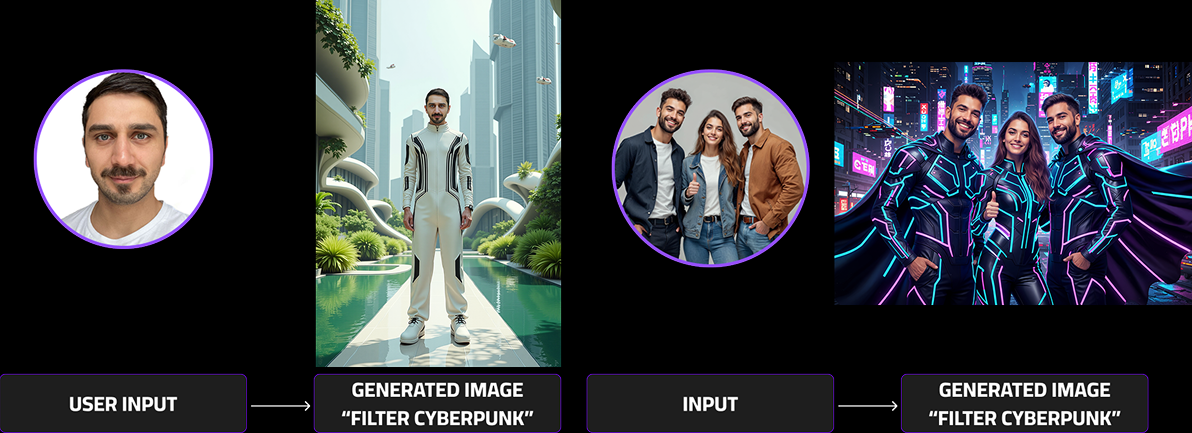
What means Standard/Template Filter?
All our available Models have FIlters you directly can use. Available in different styles and topics. The Filters are predefined and directly ready-to-be-used. Created by the Eventstation Artist.
It allows you to directly start offering our services with diverse filters immeadiatly.
What means Selfservices/own created FIlter?
Our Selfservices are esp. tailroed to enable you to be more independet. These services enable you to create own filter via text prompts. These filters can later be used in your photobooth and by the end-user.
Master the Art of filter creation and get started with our promptguide giving you the perfect starting to point for your journey.
Faceswap or Multiswap? Whats the difference?
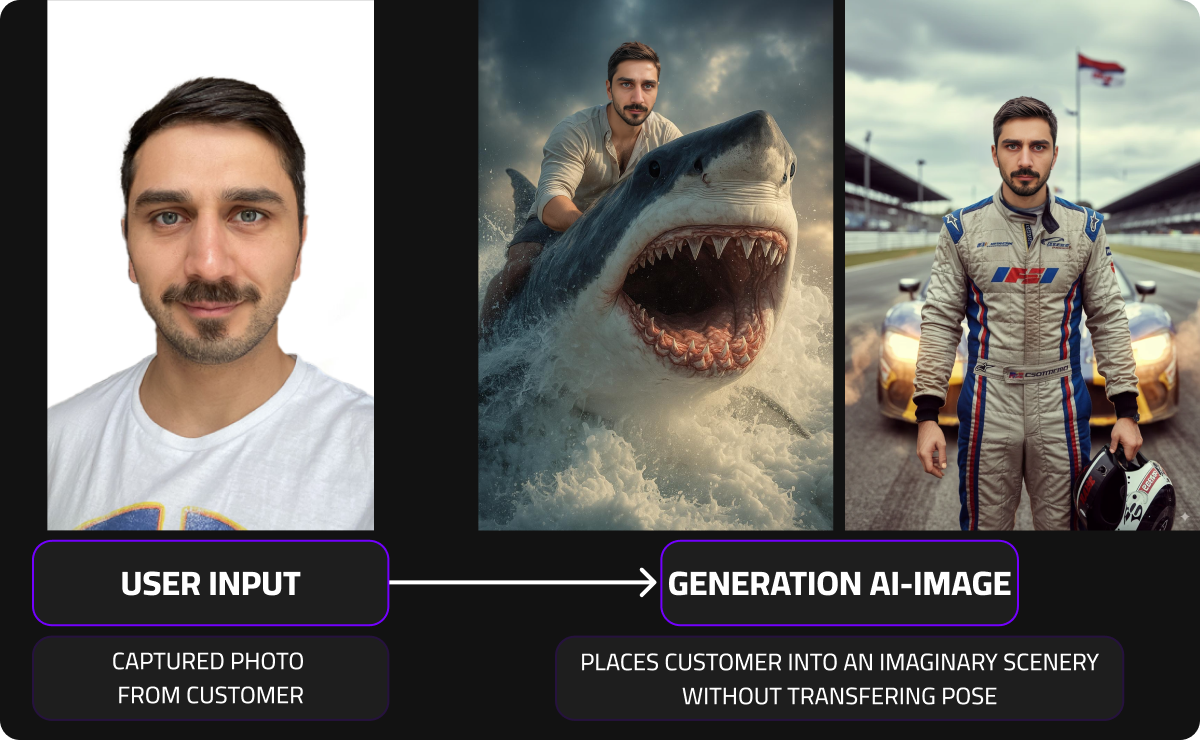
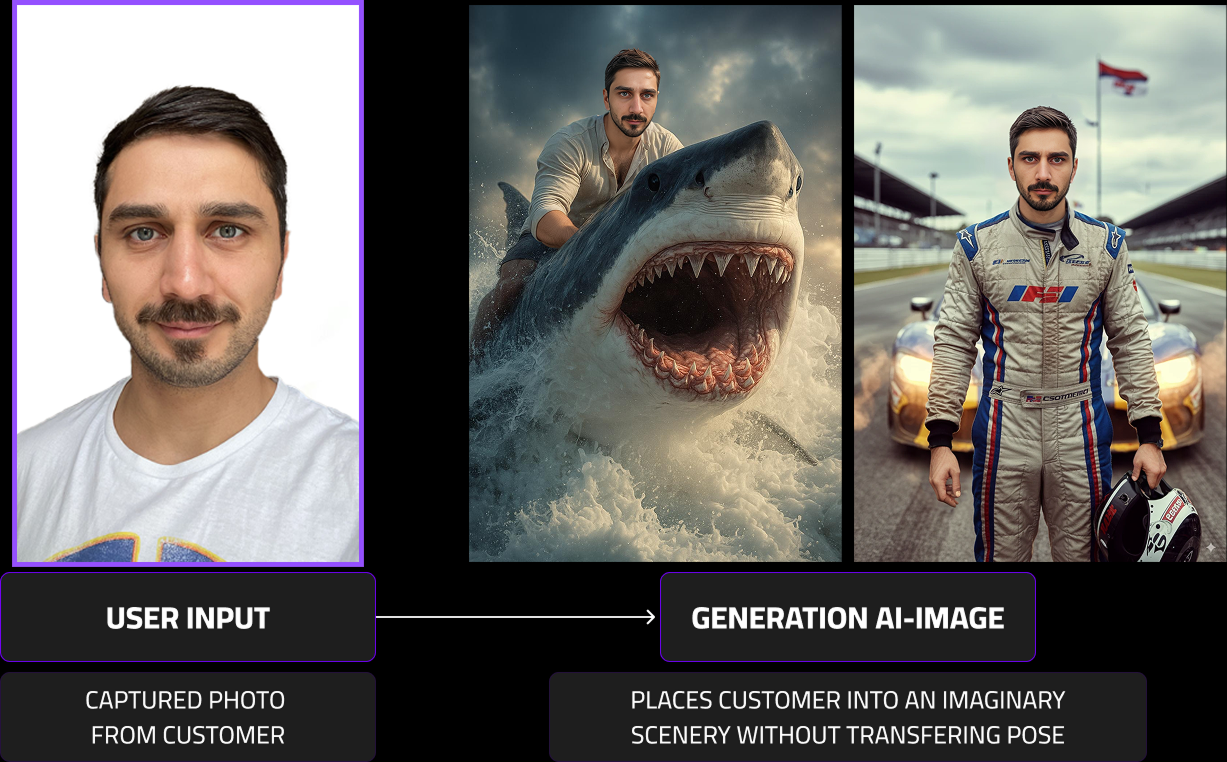
generation AI-Image
Places customer into an imaginary scenery without transfering pose
User Input
Captured Photo
from customer
Faceswap
A single-person focused re-imagination tool that lets users see themselves in new poses, styles, or sceneries.
A selfie is enough and the users becomes a samurai, astronaut, model, or any character. your identity brought to life in any world.
Pros & Cons
- Lets users re-imagine themselves with full artistic freedom, exploring new poses, styles, or scenes
- ❌Identity resemblance may vary slightly since the likeness is reconstructed within a new pose and lighting context, unlike Multiswap’s full preservation.
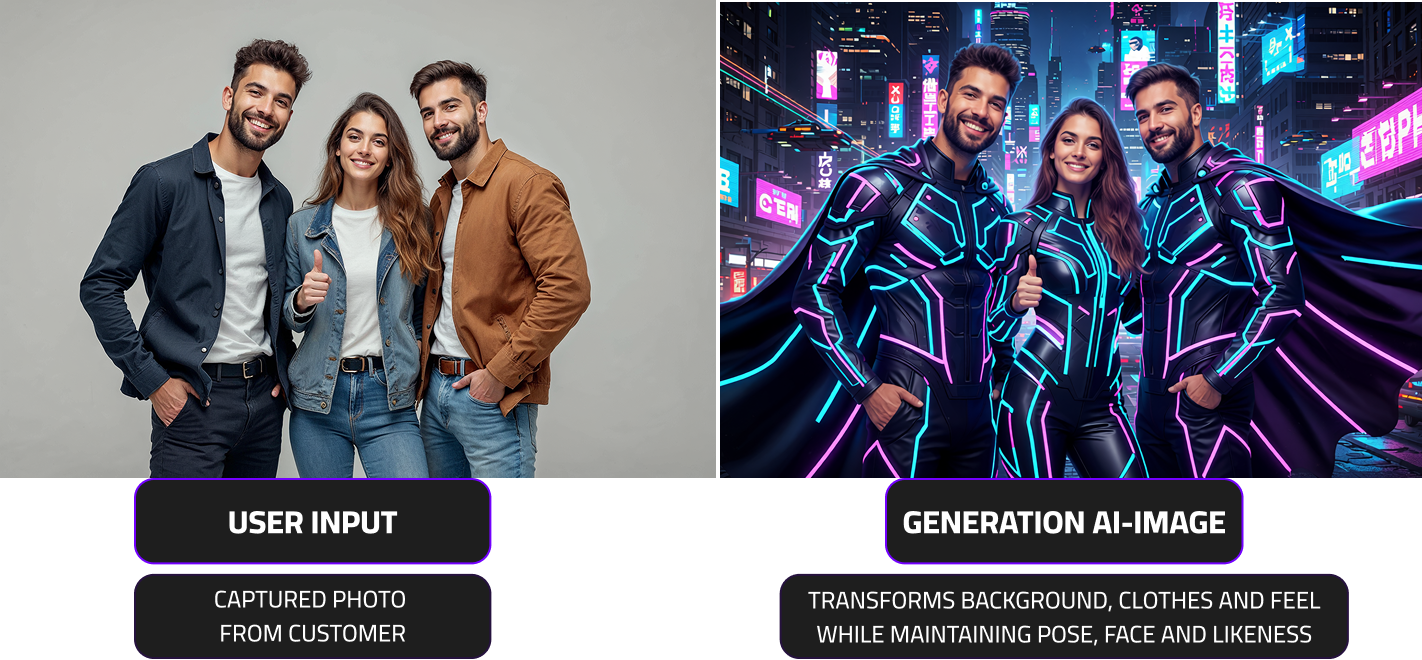
Multiswap
Transforms input images of 1–5 people into fascinating styles and filters while preserving their real identities, expressions, and poses.
The expressive character of each person: their face, emotion, and stance is faithfully reflected in every transformed image.
Pros & Cons
- Faithfully represents multiple people in an image while transforming styles, outfits, and sceneries.
- ❌Transformation is limited to style, outfit, and environment. It cannot place users into entirely new poses or bodies like Facesswap.
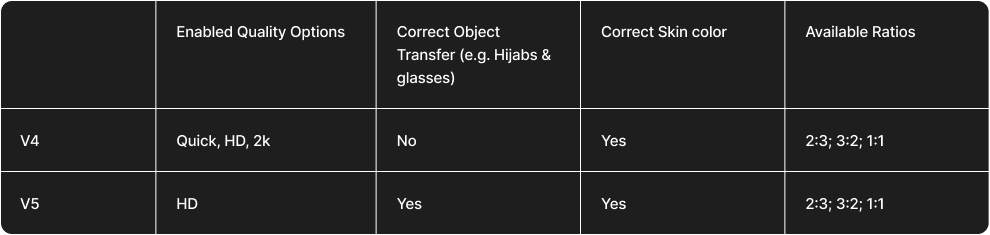
Here is a genral overview of the models capabilities and available services
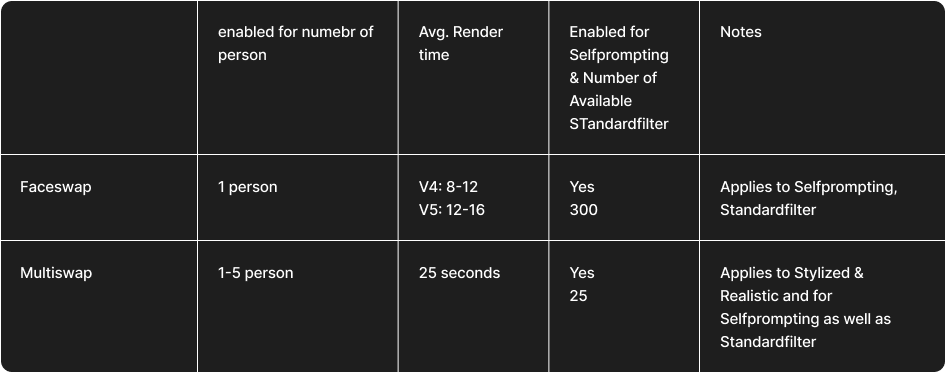
Faceswap
Our latest model v5, boasts up to 90% accuracy in representing key features — such as glasses (especially in sports scenes), bald heads, and hijabs—ensuring authentic, precise, and culturally sensitive outcomes every time.
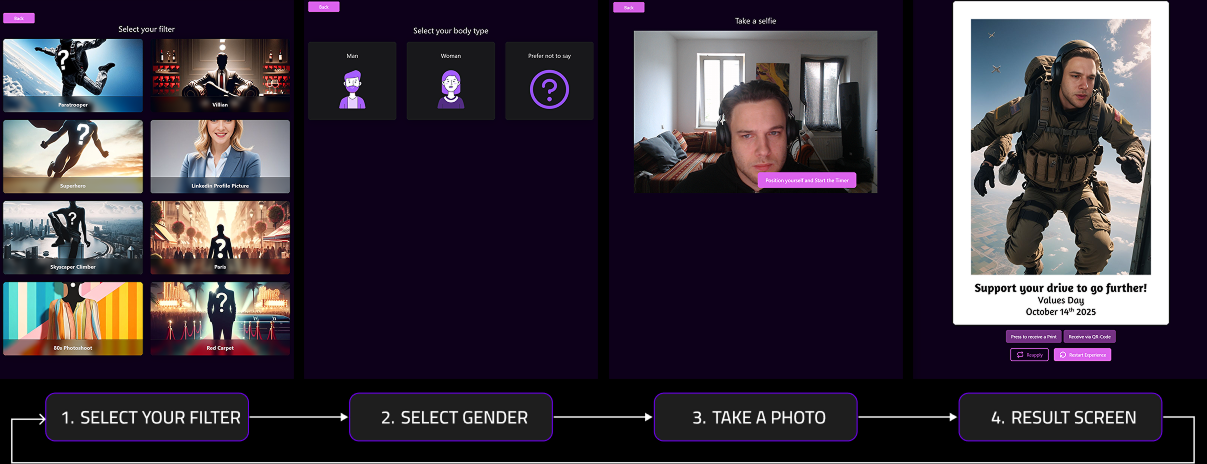
What is the proces when using a Faceswap Filter?
What Faceswap Model are available & recommended?
We recommend using our V5 Modell.
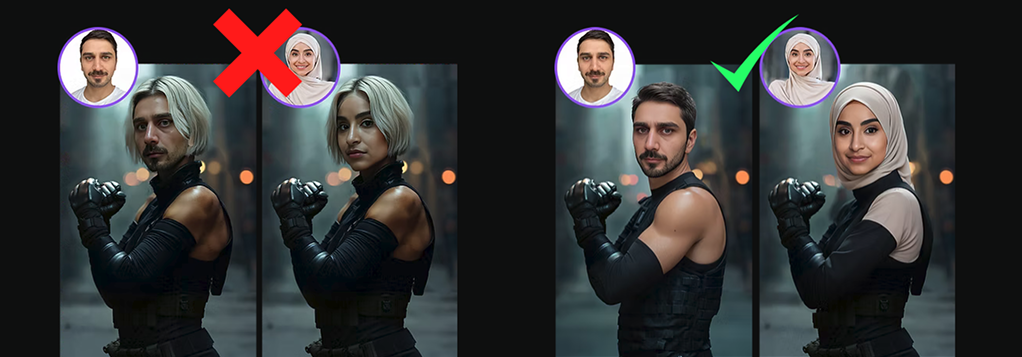
Multiswap
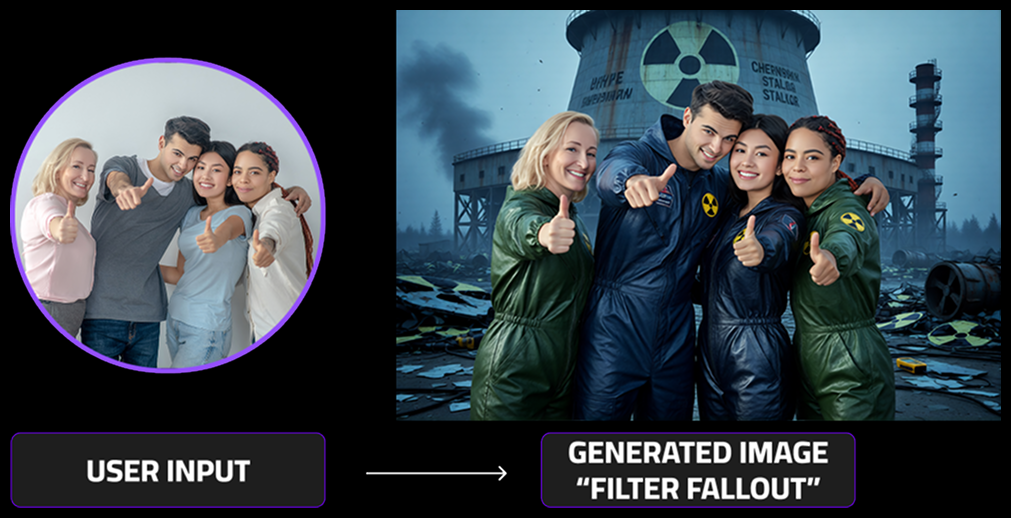
Our newest launched SoTA models are specifically designed to support group shots. Other than our faceswap models, multiswap models supports images with up to 5 persons included in the shot (faceswap is limited to one person).
- high recognizable face features
- correct trasnfer of the body size & shape
- support for up to 5 person
What Models are available?
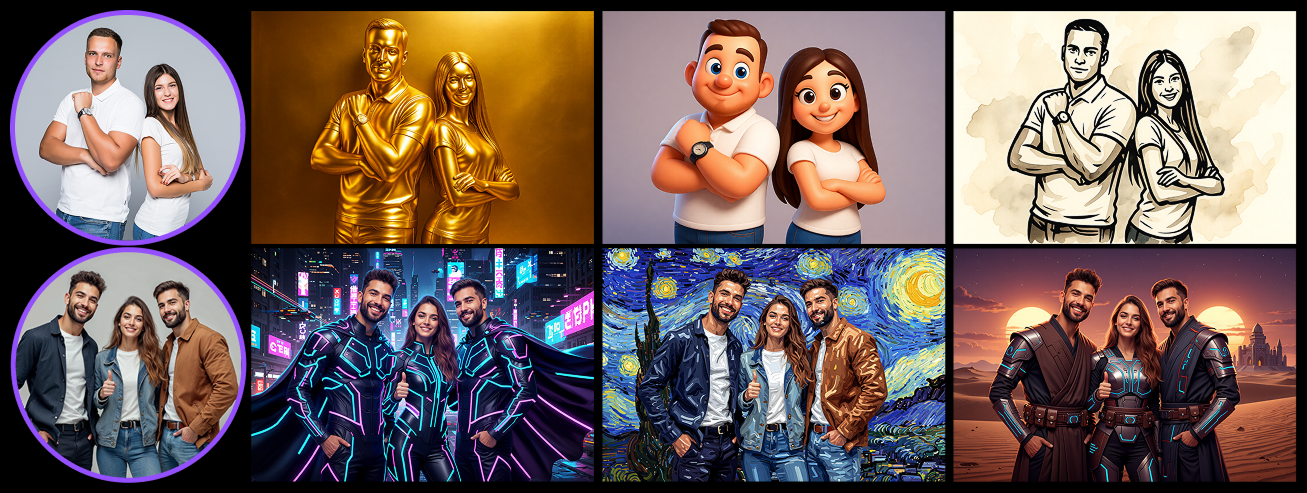
Multiswap is available in two options. Stylized & realistic are our newest Models:
- Multiswap Realistic: Specifically created to archieve high-realistic looks but also slight stylizations are possible by keeping the reconigzability oft he person as high as possible.
- Multiswap Stylized: Specifically created to archieve any kind of art style imaginable.
What is the proces when using a Multiswap Filter?
Multiswap is straight forward and does not reequire any kind of gender selection step or similar (or an automated detection you might use, to reduce the steps for your user).