WebApp Help Center > Getting Started
Home Screen Overview Functionalities
Home Screen Overview
Welcome to the Eventstation.AI WebApp Home Screen.
From here, you can navigate to all essential features for managing, creating, and showcasing your AI-powered events.
Below is an overview of each main function available on the home screen.
Start the Experience
- Launch the photo booth experience for any pre-created or self-created event.
- Select an event and begin capturing AI-generated images immediately.
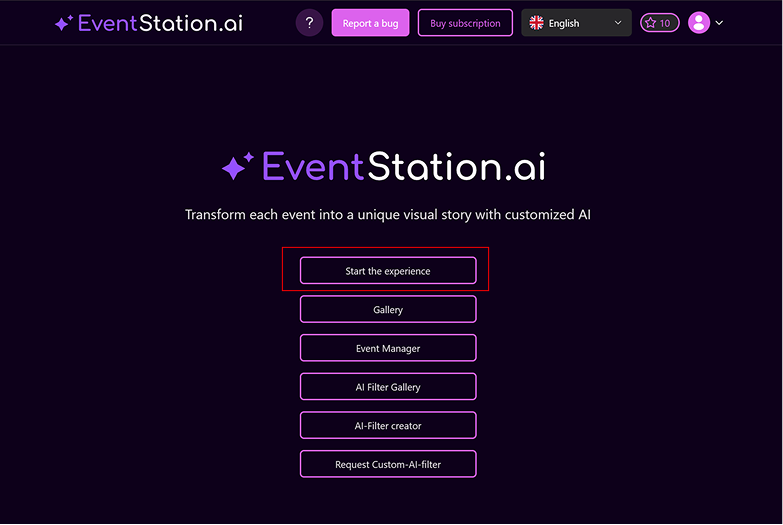
Gallery
In the Gallery, you can manage all images generated during your events.
You can:
- View images
- Print images
- Download single images or bulk downloads per event
- Manage and organize event content
Additional Features:
- Diashow Mode
Display a real-time slideshow on a second screen, cycling through newly created images automatically.
Event Manager
Your central hub for event management.
Here you can:
- Create new events
- Edit existing events
- Upload event logos
- Select AI filters
- Configure delivery and output settings
- Manage all event-related details
Everything you need to tailor an event experience is available here.
AI Filter Gallery
Access all available AI filters in one place.
You can:
- Browse EventStation template filters
- Browse your own custom filters
- Preview filters
- Search and organize filters by theme or use case
We also offer a complete PDF overview for client presentations:
AI Filter Creator
Design custom AI filters from scratch — for yourself or for a client.
You can:
- Define prompts
- Set visual styles
- Adjust attributes to create unique, branded filters
To get started:
Request Custom AI Filter
If you prefer our team to design a custom filter for you:
- Submit your creative idea
- We’ll create the filter for you
- You will receive a personalized price offer
Ideal for clients needing fully tailored AI visuals.
Profile Icon (Top Right)
Clicking the profile icon provides access to:
- Top up credits
- Manage account details
- Log out
Buy Subscription
Unlock Pro features by upgrading your plan.
The Buy Subscription button allows you to:
- Explore available pricing plans
-
Unlock Pro features such as:
-
Event logos
- Advanced filters
- Priority support
Report a Bug / Help Center Access
If you experience issues or unexpected behavior:
- Click “Report a Bug” to describe the issue and submit it directly to support.
- Access the FAQ and Help Center for troubleshooting, guides, and documentation.